There are three types of trigger in ADF/Synapse:
a) Schedule b)Tumbling Window c) Event
a) Schedule: When we create a schedule trigger we need to specify a schedule (start date, recurrence, end date), and associates with pipeline. Pipeline and trigger have a many to many relationships like one trigger can kick off multiple pipeline and Multiple trigger can kick off single pipelines.
Create a schedule trigger using Azure UI:
Create a schedule trigger using Power shell:
create a .json file in any folder like: C:\ADFv2QuickStartPSH\
Content of File: {
"properties": {
"name": "MyTrigger",
"type": "ScheduleTrigger",
"typeProperties": {
"recurrence": {
"frequency": "Minute",
"interval": 15,
"startTime": "2017-12-08T00:00:00Z",
"endTime": "2017-12-08T01:00:00Z",
"timeZone": "UTC"
}
},
"pipelines": [{
"pipelineReference": {
"type": "PipelineReference",
"referenceName": "Adfv2QuickStartPipeline"
},
"parameters": {
"inputPath": "adftutorial/input",
"outputPath": "adftutorial/output"
}
}
]
}
}
Create a Trigger:
Set-AzDataFactoryV2Trigger -ResourceGroupName $ResourceGroupName -DataFactoryName $DataFactoryName -Name "MyTrigger" -DefinitionFile "C:\ADFv2QuickStartPSH\MyTrigger.json"
Confirm the status of trigger:
Get-AzDataFactoryV2Trigger -ResourceGroupName $ResourceGroupName -DataFactoryName $DataFactoryName -Name "MyTrigger"
Start Trigger:
Start-AzDataFactoryV2Trigger -ResourceGroupName $ResourceGroupName -DataFactoryName $DataFactoryName -Name "MyTrigger"
Confirm the status of Trigger started or not:
Get-AzDataFactoryV2Trigger -ResourceGroupName $ResourceGroupName -DataFactoryName $DataFactoryName -Name "MyTrigger"
Get The Trigger Run:
Get-AzDataFactoryV2TriggerRun -ResourceGroupName $ResourceGroupName -DataFactoryName $DataFactoryName -TriggerName "MyTrigger" -TriggerRunStartedAfter "2017-12-08T00:00:00" -TriggerRunStartedBefore "2017-12-08T01:00:00"
Tumbling Window Trigger: Tumbling window triggers are a type of trigger that fires at a periodic time interval from a specified start time, while retaining state. Tumbling windows are a series of fixed-sized, non-overlapping, and contiguous time intervals. A tumbling window trigger has a one-to-one relationship with a pipeline and can only reference a singular pipeline.


| delay | Delay:The amount of time to delay the start of data processing for the window. The pipeline run is started after the expected execution time plus the amount of delay. The delay defines how long the trigger waits past the due time before triggering a new run. The delay doesn’t alter the window startTime. For example, a delay value of 00:10:00 implies a delay of 10 minutes. |
| maxConcurrency | The number of simultaneous trigger runs that are fired for windows that are ready. For example, to back fill hourly runs for yesterday results in 24 windows. If maxConcurrency = 10, trigger events are fired only for the first 10 windows (00:00-01:00 - 09:00-10:00). After the first 10 triggered pipeline runs are complete, trigger runs are fired for the next 10 windows (10:00-11:00 - 19:00-20:00). Continuing with this example of maxConcurrency = 10, if there are 10 windows ready, there are 10 total pipeline runs. If there's only 1 window ready, there's only 1 pipeline run |
| dependsOn: type | The type of TumblingWindowTriggerReference. Required if a dependency is set. |
| dependsOn: size | The size of the dependency tumbling window. |
| dependsOn: offset | The offset of the dependency trigger. A timespan value that must be negative in a self-dependency. If no value specified, the window is the same as the trigger itself. |
Execution order of windows in backfill scenario: the startTime of trigger is in the past, then based on this formula, M=(CurrentTime- TriggerStartTime)/TumblingWindowSize, the trigger will generate {M} backfill(past) runs in parallel, honoring trigger concurrency, before executing the future runs.
Create a tumbling window dependency:
Offset of the dependency trigger. Provide a value in time span format and both negative and positive offsets are allowed. This property is mandatory if the trigger is depending on itself and in all other cases it is optional. Self-dependency should always be a negative offset. If no value specified, the window is the same as the trigger itself.
Size of the dependency tumbling window. Provide a positive timespan value. This property is optional.
Tumbling window Self dependency properties:
In scenarios where the trigger shouldn't proceed to the next window until the preceding window is successfully completed, build a self-dependency.
Dependency offset

Dependency size

Self-dependency
Dependency on another tumbling window trigger

Dependency on itself

Difference between schedule Trigger and Tumbling window Trigger:
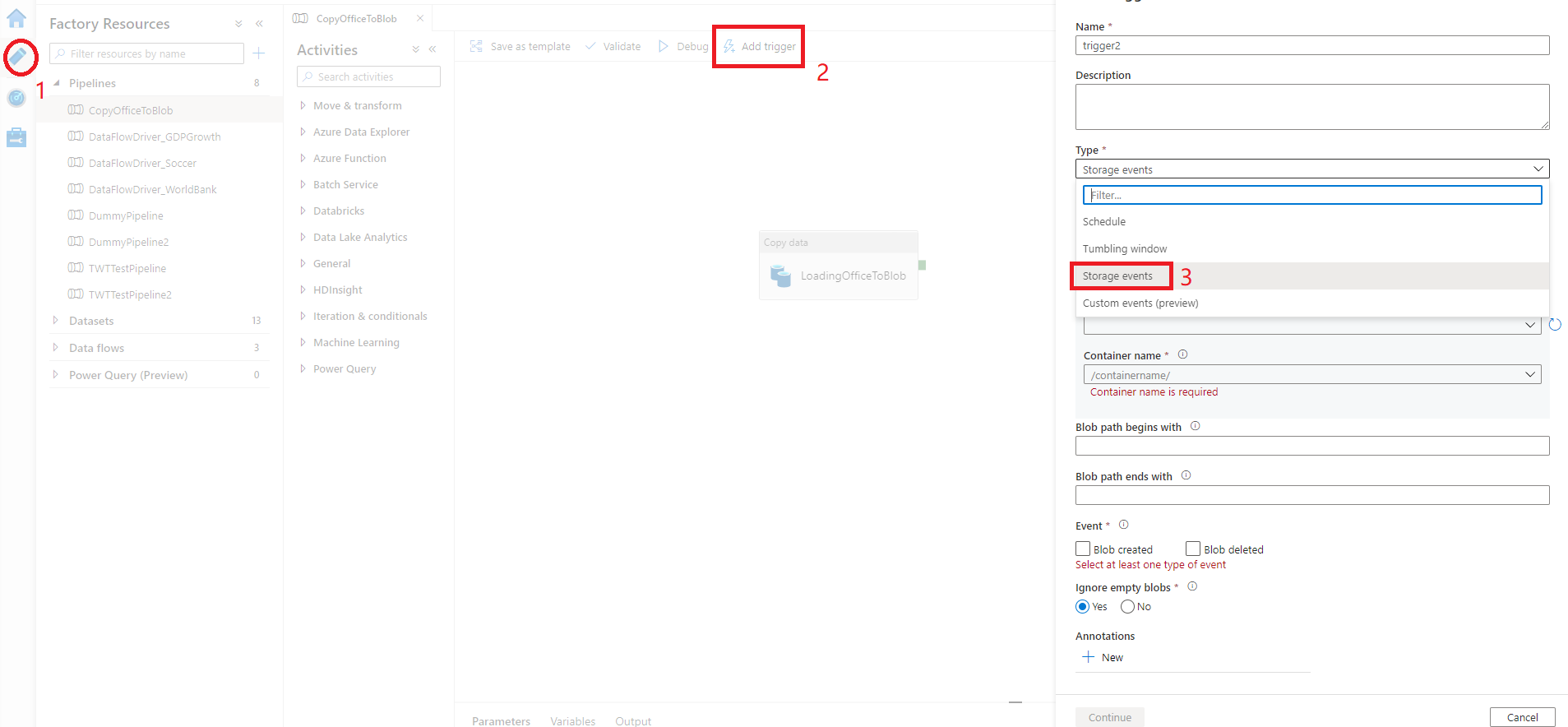
Select your storage account from the Azure subscription dropdown or manually using its Storage account resource ID. Choose which container you wish the events to occur on. Container selection is required, but be mindful that selecting all containers can lead to a large number of events.
The Blob path begins with and Blob path ends with properties allow you to specify the containers, folders, and blob names for which you want to receive events.
- Blob path begins with: The blob path must start with a folder path. Valid values include
2018/and2018/april/shoes.csv. This field can't be selected if a container isn't selected. - Blob path ends with: The blob path must end with a file name or extension. Valid values include
shoes.csvand.csv. Container and folder names, when specified, they must be separated by a/blobs/segment. For example, a container named 'orders' can have a value of/orders/blobs/2018/april/shoes.csv. To specify a folder in any container, omit the leading '/' character. For example,april/shoes.csv
Any of following RBAC settings works for storage event trigger:
- Owner role to the storage account
- Contributor role to the storage account
- Microsoft.EventGrid/EventSubscriptions/Write permission to storage account
Flow Diagram:
custom event trigger:
Data integration scenarios often require Azure Data Factory customers to trigger pipelines when certain events occur. Data Factory native integration with Azure Event Grid now covers custom topics.
To use the custom event trigger in Data Factory, you need to first set up a custom topic in Event Grid.
Trigger Metadata in pipeline:
Pipeline sometimes needs to understand and reads metadata from trigger that invokes it. For instance, with Tumbling Window Trigger run, based upon window start and end time, pipeline will process different data slices or folders.
his pattern is especially useful for Tumbling Window Trigger, where trigger provides window start and end time, and Custom Event Trigger, where trigger parse and process values in custom defined data field.